
Time-Saving Review Management: How to Save 5 Hours Per Week

Most UK small business owners spend 5-7 hours per week on review management without realising it. Few would guess that number, because the time doesn't show up in a calendar. It leaks.
Here's where it goes, and how to get most of it back.
Where 5 hours actually disappears
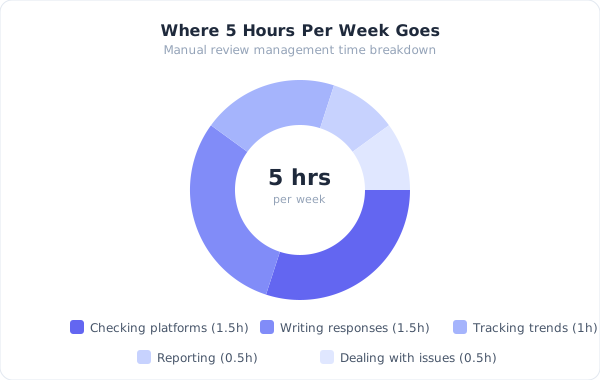
The obvious part is reading and responding to reviews. But that's maybe 40% of the time. The rest is invisible.
Platform hopping (45-60 minutes/week): Logging into Google Business Profile, then Facebook, then Trustpilot. Waiting for dashboards to load. Checking for new reviews. If you manage multiple locations, multiply this by each location. A 3-location restaurant group might check 9 different review pages.
Crafting individual responses (90-120 minutes/week): Writing a thoughtful response to a negative review takes 10-15 minutes. You're weighing words, considering how it reads publicly, maybe running it past a business partner. Positive reviews take less time, but "less" still means 2-3 minutes each when you're being genuine rather than pasting the same reply.
Monitoring and firefighting (30-45 minutes/week): Checking for new reviews at random times during the day. Getting a notification about a 1-star review and dropping everything to deal with it. Reading competitors' reviews to see how you compare. This is the most scattered, unproductive time.
Tracking and reporting (30-45 minutes/week): If you track anything at all — and you should — it's probably a spreadsheet. Manually logging ratings, counting reviews by platform, noting trends. Most businesses don't bother, which means problems go unnoticed until they're serious.
Internal communication (20-30 minutes/week): Sharing negative reviews with staff. Discussing recurring complaints. Deciding who responds to what. In small teams, this happens through scattered WhatsApp messages and hallway conversations.
Add it up: 4-6 hours per week, and that's for a single location with moderate review volume — a handful of new reviews a week across platforms. If you're getting more than that, the time cost scales fast.
Batch responding saves the most time
The single biggest time-saver isn't a tool. It's a habit change.
Stop checking reviews throughout the day. Instead, set two review windows: one in the morning, one in late afternoon. That's it.
Batch processing works because context-switching is expensive. Every time you break to check for reviews, you lose 10-15 minutes of productive work beyond the review itself. UC Irvine research found it takes 23 minutes on average to refocus after an interruption.
The morning batch (10 minutes): Open your review platforms (or your review management tool). Read everything new. Reply to positive reviews. Flag negative ones for your afternoon slot.
The afternoon batch (10 minutes): Write thoughtful responses to flagged reviews. You've had time to think. Your replies will be better than a knee-jerk reaction at 9am.
That's 20 minutes a day, 5 days a week. Under 2 hours total, down from 5+.
Response templates with real personalisation
Templates get a bad reputation because most businesses use them badly. "Thank you for your kind words! We look forward to serving you again!" — that's not a template, it's a brush-off, and customers can tell.
Good templates give you structure, not scripts. Here's the difference:
Bad template: "Thank you for your wonderful review! We're so glad you enjoyed your experience. We hope to see you again soon!"
Good template: "Thanks [name] — really glad you enjoyed [specific thing they mentioned]. [Personal touch related to their visit]. Hope to see you back for [relevant suggestion]."
The template gives you the bones. You fill in the specifics in 30-60 seconds instead of 3 minutes. For a business getting 8 positive reviews a week, that's 12-16 minutes saved.
For negative reviews, templates are even more useful. Not because you want to sound scripted, but because you want consistent structure:
- Acknowledge what happened
- Apologise without being defensive
- Explain what you're doing about it
- Take it offline with a direct contact
Having that framework ready means you spend your time on the specifics rather than figuring out your approach from scratch every time.
This is also where AI drafting earns its keep. Reviewdar drafts a reply from the review itself; you edit it into your own words and post. The structure is handled, and your minutes go on the specifics.
Automated alerts beat manual checking

Checking platforms manually is the most wasteful habit in review management. You're spending time to confirm that nothing has happened.
Set up alerts instead. Google Business Profile has built-in email notifications for new reviews. Facebook Page notifications cover recommendations. Trustpilot emails you about new reviews from your business account.
If you use a review management tool, you get all alerts in one place — usually via email or a dashboard. Reviewdar's inbox, for instance, pulls Google, Facebook and Trustpilot reviews together, and read-only Tripadvisor and Yelp imports are rolling out on higher plans. The key is replacing the "let me go check" habit with "I'll deal with it when it arrives."
One caveat: turn off push notifications for positive reviews if they distract you. Route those to email. Only let negative reviews (3 stars or below) interrupt your day — and even then, a response within a few hours is fine. The 24-hour response window that most customers expect gives you plenty of breathing room.
Weekly review beats daily obsession
Daily checking is for responses. Weekly checking is for patterns.
Pick a time — Friday afternoon works well. Spend 15-20 minutes looking at the bigger picture:
- How many reviews came in this week across all platforms?
- What's the average rating compared to last week?
- Any topics mentioned more than twice? (Staff names, wait times, specific products)
- How's your response rate? (Aim for 90%+)
Monthly, zoom out further:
- Rating trend over 4 weeks. Going up, down, or flat?
- Which platform is getting the most volume?
- Any seasonal patterns? (Restaurants often see dips in January, trades see spikes in spring)
This is where spreadsheet tracking falls apart. Manual data entry is tedious and the first thing you skip when busy. Either commit to it or use a tool that tracks automatically — Reviewdar tracks your rating trend, the topics customers raise and your response rate for you, and exports a summary report as CSV, so the Friday review is reading, not typing.
When tools make sense (and when they don't)
A single-location business with fewer than 5 reviews per week probably doesn't need a dedicated review management tool. The batch-and-template approach handles that volume.
Tools start paying for themselves when:
- You're managing 2+ locations
- You're getting 10+ reviews per week across platforms
- You need to track trends over time
- Multiple team members handle review responses
- You're spending more than 3 hours per week on review management
The maths isn't complicated. If a tool costs £30/month and saves you 3 hours per week, you're valuing your time at £2.50/hour without it. For most business owners, that time is worth more spent on operations, sales, or just clocking off earlier.
The realistic target
You won't get review management to zero hours. Nor should you — your responses should sound like they come from someone who cares, because they do. But you can absolutely get from 5+ hours to under 2 hours per week with better habits alone, or under 1 hour with the right tool.
That's 3-4 hours back. Per week. Every week. Over a year, that's roughly 175 hours — more than four full working weeks.
Spend those hours on your business. Or don't spend them at all. Either way, they're yours.
See how Reviewdar cuts review management time for UK small businesses →
Ready to transform your review management?
Join thousands of UK businesses using Reviewdar to manage their online reputation.